Clustering
Clustering consists of receiving an input point cloud and finding points that
can be grouped together into clusters. The clusters are typically represented
with integer values \(c \in \mathbb{Z}_{\geq -1}\), where the value
\(-1\) is used to represent no cluster or noise cluster. Clustering
computations are carried out through Clusterer components. They
can be included in pipelines. Besides, it is possible to define a
post-processing pipeline
that will be computed immediately after the clustering.
Clusterers
DBScan clusterer
The DBScanClusterer can be used to compute Density-Based Spatial
Clustering of Applications with Noise (DBSCAN) in the point cloud. The DBSCAN
algorithm considers a minimum number of points and a radius to define the
neighborhood for spatial queries. It finds kernel points, those in whose
neighborhood there are at least the minimum number of points. Then, it
considers any accessible point to be in the cluster. The accessible points
that are not kernel points are included in the cluster because they are
close enough to the kernel points. However, these points are not considered
to include new points as only kernel points can be used to determine whether
a point is accessible or not. The JSON below shows how to define a DBScan
clustering component:
{
    "clustering": "fpsdecorated",
    "fps_decorator": {
        "num_points": "m/10",
        "fast": true,
        "num_encoding_neighbors": 1,
        "num_decoding_neighbors": 1,
        "release_encoding_neighborhoods": false,
        "threads": 16,
        "representation_report_path": null
    },
    "decorated_clusterer": {
        "clustering": "dbscan",
        "cluster_name": "cluster_wood",
        "precluster_name": "Prediction",
        "precluster_domain": [1],
        "min_points": 200,
        "radius": 3.0,
        "post_clustering": [
            {
                "post-processor": "ClusterEnveloper",
                "envelopes": [
                    {
                        "type": "AlignedBoundingBox",
                        "compute_volume": true,
                        "output_path": "*/aabbs.csv",
                        "separator": ","
                    },
                    {
                        "type": "BoundingBox",
                        "compute_volume": true,
                        "output_path": "*/bboxes.csv",
                        "separator": ","
                    }
                ]
            }
        ]
    }
}
The JSON above defines a DBScanClusterer that is decorated to work
on a FPS representation of the input point cloud (see
the FPS decorated clusterer documentation
for further details). It will consider all the points predicted as wood to
compute clusters of wood. The minimum number of points in the neighborhoods of
kernel points is set to 200 points, and the radius of the neighborhood to
3 meters. After computing the clustering, a post-processing pipeline will be
run to find the axis-aligned and oriented bounding boxes, respectively. For
each bounding box the vertices, the cluster label, and the enclosed volume will
be exported to a CSV file using , as separator.
Arguments
- –
cluster_name The name of the clusters. For instance, when finding clusters of buildings it is a good idea to use
"cluster_building"as the cluster name.- –
precluster_name In case the point cloud is already clustered, the precluster name specifies the point-wise attribute to consider to filter the points. Note that both reference and predicted classes can be seen as clusters.
- –
precluster_domain If the preclustering filter is applied, then the precluster domain list can be used to specify the values of interest (any point that is not in the domain will be ignored). If not given and preclustering filter is requested, then the precluster domain will be automatically inferred as the set of unique values for the attribute.
- –
min_points The minimum number of points that must belong to a neighborhood to pass the kernel point check.
- –
radius The radius of the neighborhood for kernel point checks.
- –
post_clustering The post-clustering pipeline. It can be
nullor a list of post-clustering components.
Bivariate critical clusterer
The BivariateCriticalClusterer can be used to compute one cluster per
critical point in the given point cloud. The bivariate critical clustering
algorithm considers the requested type of critical point (e.g., min or max)
and then does a distance-based clustering. It is called bivariate because
it works on three variables \((x, y, z)\) (they can be the coordinates or
any other variables, including those from the feature space). Assuming Monge
form \(z = \hat{z}(x, y)\), the critical points will correspond to the
minima or maxima of the third variable \(z\) on the surface defined by the
other two \((x, y)\). The clusters for each critical point can be computed
through the nearest neighbor method or using a distance-based region growing
algorithm. The JSON below shows how to define a bivariate critical clustering
component:
{
    "clustering": "BivariateCritical",
    "cluster_name": "avocado",
    "precluster_name": "Prediction",
    "precluster_domain": [1],
    "critical_type": "max",
    "filter_criticals": false,
    "radius": 2.0,
    "x": "x",
    "y": "y",
    "z": "z",
    "strategy": {
        "type": "RecursiveRegionGrowing",
        "initial_radius": 0.25,
        "growing_radius": 0.25,
        "max_iters": 20000,
        "first_stage": false,
        "first_stage_correction": false,
        "second_stage": true,
        "nn_correction": false
    },
    "label_criticals": false,
    "critical_label_name": "max",
    "chunk_size": 50000,
    "nthreads": 8,
    "kdt_nthreads": 2
}
The JSON above defines a BivariateCriticalClusterer that will
consider the point-wise coordinates (i.e., the structure space of the point
cloud) as the variables for the clustering. The critical points will be
searched on a radius of \(2\) meters and the clustering strategy will be
the recursive region growing algorithm. Furthermore, the clustering will be
computed in parallel dividing the workload in chunks of \(50,000\) points
using \(8\) parallel jobs, each with \(2\) threads for each
KDTree-based spatial query.
Arguments
- –
cluster_name The name of the clusters. For instance, when finding clusters of avocados it is a good idea to use
"avocado"as the cluster name.- –
precluster_name In case the point cloud is already clustered, the precluster name specifies the point-wise attribute to consider to filter the points. Note that both reference and predicted classes can be seen as clusters.
- –
precluster_domain If the preclustering filter is applied, then the precluster domain list can be used to specify the values of interest (any point that is not in the domain will be ignored).
- –
crtical_type The type of critical point to be considered, either
"min"or"max".- –
filter_criticals Boolean mask governing whether to filter critical points in case there is more than one in a neighborhood of the given radius. When
trueall the crtitical points in the same neighborhood but one will be discarded (this happens when both are maxima or minima, e.g., they have the same \(z\) coordinate). Whenfalseall the critical points will be kept, even if this implies more than one per neighborhood.- –
radius The radius for the neighborhood analysis used to find the critical points. Note that it is a 2D radius because only the first and second variables (i.e., \((x, y)\)) are considered for the spatial queries.
- –
x The first variable, e.g.,
"x".- –
y The second variable, e.g.,
"y".- –
z The third variable, e.g.,
"z". Note that critical points will be minima or maxima with respect to this variable.- –
strategy The strategy specification for the clustering. It can be either the nearest neighbor method or the recursive region growing algorithm.
– Nearest neighbor method
–
typeIt must be
"NearestNeighbor".– Recursive region growing algorithm
–
typeIt must be
"RecursiveRegionGrowing".—
initial_radiusThe radius for the initial clusters. The distance is computed considering the \((x, y)\) variables, i.e., in 2D. All the points that are inside this radius with respect to a critical point will belong to its cluster.
—
growing_radiusThe radius for each region growing step. Again, distances will be computed in the plane defined by the first two variables \((x, y)\).
—
max_itersThe maximum number of iterations for the clustering. If zero, then the clustering will run until full convergence is achieved.
—
first_stageWhether to compute the first stage of the region growing strategy (
true) or not (false). This stage considers any point in the cluster to analyze its neighborhood. Any point in the neighborhood that is at the same height or lower (when max critical points are considered) or at the same height or above (when min critical points are considered) will be included in the cluster. The aforementioned process will be computed recursively until not more points are added to a cluster or the max number of iterations is reached.—
first_stage_correctionWhether to apply a concave hull-based correction to the first stage (
true) or not (false). The correction consists of computing the 2D concave hull for each cluster (on the \(x\) and \(y\) coordinates) and then include in the cluster any point that is inside the concave hull.—
second_stageWhether to compute the second stage of the region growing strategy. In this stage, the clusters grow considering the neighborhood for each point in the cluster, and doing so recursively to account for newly added points during the iterations of the second stage too. The second stage stops when not even a single cluster grew or when the maximum number of iterations is reached.
—
nn_correctionWhether to apply the nearest neighbor method after finishing the clustering (
true) or not (false). If applied, it will consider all the points that have not been clustered by the region growing algorithm and assign them to the cluster of its closest clustered neighbor.
– label_criticals
Whether to label the critical points (
true) or not (false). Note that the point cloud will be updated with an extra feature that will be a label specifying whether it is a critical point or not.
– critical_label_name
The name for the feature that labels critical points.
- –
chunk_size How many points per chunk for the parallel exeuction. If zero, then all the points are consireded in a single chunk.
- –
nthreads How many chunks will be computed in parallel at the same time.
- –
kdt_nthreads How many threads will be used to speedup the computation of the spatial queries through the KDTree. Note that the final number of parallel jobs will be \(\text{nthreads} \times \text{kdt_nthreads}\).
Output
The figure below represents the bivariate critical clusters computed on the maxima of a previously classified avocado plantation. There are approximately as many clusters as avocados, with each cluster generally corresponding to a different avocado.
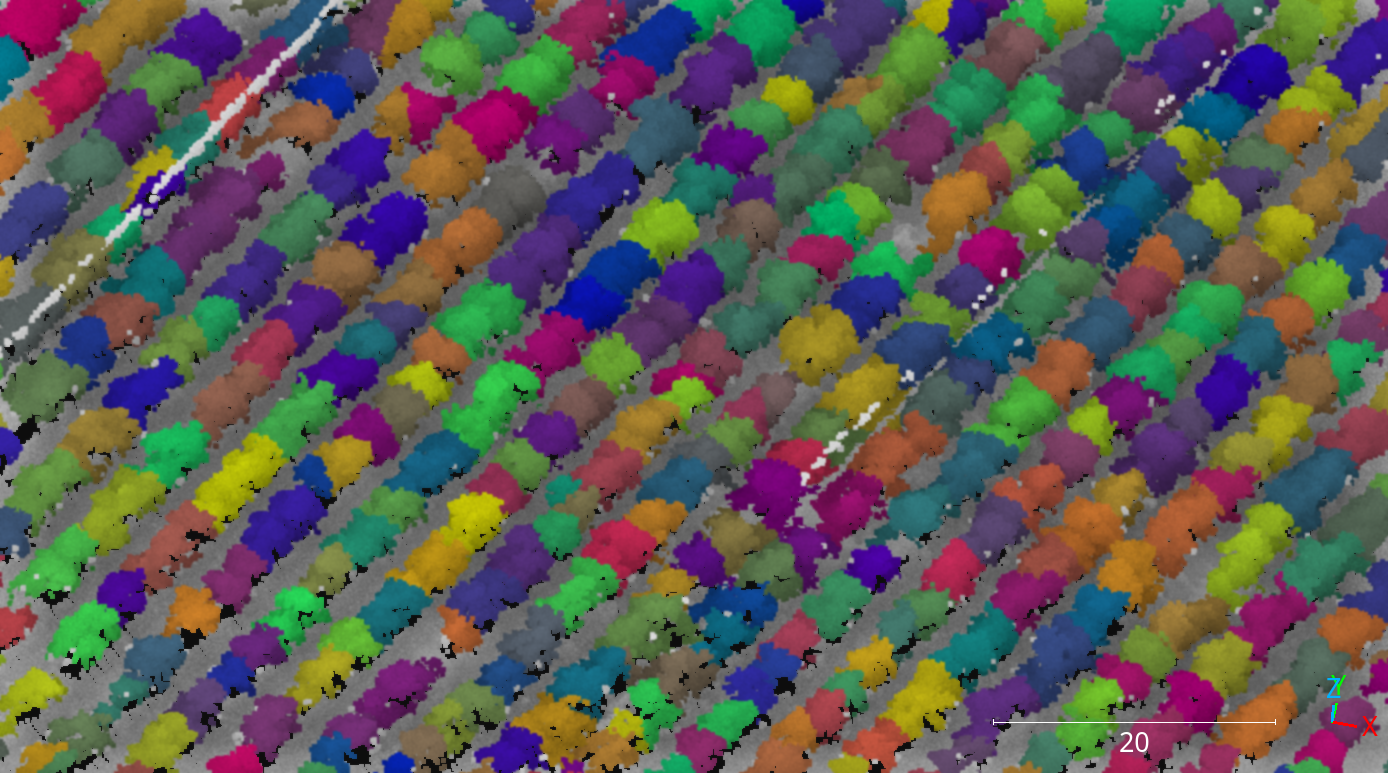
Visualization of the avocado clusters computed through the bivariate critical clustering algorithm with the region growing strategy.
Post-processing
Once clusters are available, it might be useful to apply some post-processing
to derive useful information from them. That is what post-processing
components aim to do. They can be defined in the "post_clustering" list.
The execution will start by the first component in the list and will end
at the last one, i.e., it is sequential with respect to the order in the list.
ClusterEnveloper
The ClusterEnveloper can be used to find the geometry enclosing the
points. Envelopes often support the estimation of the enclosed volume. They can
be exported to output files. The JSON below shows how to define a cluster
enveloper post-processor inside the post-processing pipeline of a clusterer.
"post_clustering": [
    {
        "post-processor": "ClusterEnveloper",
        "envelopes": [
            {
                "type": "AlignedBoundingBox",
                "compute_volume": true,
                "output_path": "*/aabbs.csv",
                "separator": ","
            },
            {
                "type": "BoundingBox",
                "compute_volume": true,
                "output_path": "*/bboxes.csv",
                "separator": ","
            }
        ]
    }
]
The JSON above defines a ClusterEnveloper that will compute the
axis-aligned bounding box and also the oriented bounding box. The volume will
be computed for each envelope and they will be exported to a CSV file.
More concretely, each row in the CSV will contain three coordinates
representing a vertex, an integer representing the cluster label, and the
estimated volume. All the values will be separated by ,.
Arguments
- –
envelopes List of envelopes that must be computed by the
ClusterEnveloper–
typeThe type of the envelope, it can be
"AxisAlignedBoundingBox"or"BoundingBox"(the edges of the last one are not necessarily parallel to the vectors of the canonical basis).–
compute_volumeFlag to specify whether to compute the volume enclosed by the envelope (
true) or not (false).–
output_pathThe path where the envelope’s data will be exported (typically in CSV format).
–
separatorThe separator to be used in the output CSV file.
ClusterMarker
The ClusterMarker can be used to compute a point for each cluster
to represent it. These points can be exported as CSV files or shapefiles.
The JSON below shows how to define a cluster marker post-processor inside the
post-processing pipeline of a clusterer.
"post_clustering": [
    {
        "post-processor": "ClusterMarker",
        "strategy": "centroid",
        "proj_str": null,
        "epsg": 32630,
        "output_path": "*/marks.shp",
        "nthreads": -1
    }
]
The JSON above defines a ClusterMarker that will compute the centroid
for each cluster as a marker. The output will be exported in the EPSG:32630
CRS to a shapefile called marks.shp. The computations will be carried out
using all the cores available in the system.
Arguments
- –
strategy The strategy that must be used to compute the markers. Supported strategies are
"centroid", (seeClusterMarker.compute_cluster_centroid()),"midrange"(seeClusterMarker.compute_cluster_midrange()),"medianoid"(seeClusterMarker.compute_cluster_medianoid()),"medoid"(seeClusterMarker.compute_cluster_medoid()), and"geometric_median"(seeClusterMarker.compute_cluster_geometric_median()).- –
proj_str The coordinate reference system specified as a projection string (proj).
- –
epsg Can be optionally used to specified the CRS following the European Petroleum Survey Groups (EPSG) standard format.
- –
nthreads The number of threads that must be used for the parallel computations. Note that -1 means using as many threads as available cores.
- –
output_path The output path where the markers must be written. Note that if the extension is
.shp, then the output will be written as a shapefile. Otherwise, it will be written as an ASCII CSV file.
ClusterSelector
The ClusterSelector can be used to discard those clusters that do not
satisfy satisfy some given criteria. It consists of a list of filters that
check some given relationals and either preserve or discard those clusters
that satisfy them. The JSON below shows how to define a cluster enveloper
post-processor inside the post-processing pipeline of a clusterer.
"post_clustering": [
    {
        "post-processor": "ClusterSelector",
        "filters": [
          {
            "attribute": "number_of_points",
            "relational": "greater_than_or_equal_to",
            "target": 256,
            "action": "preserve"
          },
          {
            "attribute": "surface_area",
            "relational": "less_than",
            "target": 1,
            "action": "discard"
          },
          {
            "attribute": "z_length",
            "relational": "less_than",
            "target": 3,
            "action": "discard"
          }
        ]
    }
]
The JSON above defines a ClusterSelector that will preserve only
the clusters with at least \(256\) points and discard those whose convex
hull has a surface area less than \(1\) meter or whose length along
the \(z\)-axis is below the \(3\) meters.
Arguments
- –
filters The list of filters based on relational conditions to decide whether to preserve or discard those clusters who satisfy them.
- –
attribute The attribute involved in the relational condition as the left-hand side. Supported attributes are
"number_of_points","surface_area","volume","surface_density","volume_density","x_length","y_length"and"z_length". Their description can be read in the documentation ofClusterSelector.- –
relational The relational governing the condition. Supported relationals are
"not_equals"\(x \neq y\),"equals"\(x = y\),"less_than"\(x < y\),"less_than_or_equal_to"\(x \leq y\),"greater_than"\(x > y\),"greater_than_or_equal_to"\(x \geq y\),"in"\(x \in S\),"not_in"\(x \notin S\), and"inside"\(x \in [a, b] \subset \mathbb{R}\).- –
target The right-hand side of the relational condition.
- –
action Whether to
"preserve"or"discard"the clusters that satisfy the relational condition.
- –
Decorators
Furthest point sampling decorator
The FPSDecoratorTransformer can be used to decorate a data clusterer
such that the computations can take place in a transformed space of reduced
dimensionality. Typically, the domain of a clustering is the entire point
cloud, let us say \(m\) points. When using a FPSDecoratedClusterer
this domain will be transformed to a subset of the original point cloud with
\(R\) points, such that \(m \geq R\). Decorating a clusterer with this
decorator can be useful to reduce its execution time.
{
    "clustering": "fpsdecorated",
    "fps_decorator": {
        "num_points": "m/10",
        "fast": true,
        "num_encoding_neighbors": 1,
        "num_decoding_neighbors": 1,
        "release_encoding_neighborhoods": false,
        "threads": 16,
        "representation_report_path": null
    },
    "decorated_clusterer": {
        "clustering": "dbscan",
        "cluster_name": "cluster_wood",
        "precluster_name": "Prediction",
        "precluster_domain": [1],
        "min_points": 200,
        "radius": 3.0,
        "post_clustering": [
            {
                "post-processor": "ClusterEnveloper",
                "envelopes": [
                    {
                        "type": "AlignedBoundingBox",
                        "compute_volume": true,
                        "output_path": "*/aabbs.csv",
                        "separator": ","
                    },
                    {
                        "type": "BoundingBox",
                        "compute_volume": true,
                        "output_path": "*/bboxes.csv",
                        "separator": ","
                    }
                ]
            }
        ]
    }
}
Arguments
- –
fps_decorator The specification of the furthest point sampling (FPS) decoration carried out through the
FPSDecoratorTransformer.- –
num_points The target number of points \(R\) for the transformed point cloud. It can be an integer or an expression that will be evaluated with \(m\) representing the number of points of the original point cloud, e.g.,
"m/2"will downscale the point cloud to half the number of points.- –
fast Whether to use exact furthest point sampling (
false) or a faster stochastic approximation (true).- –
num_encoding_neighbors How many closest neighbors in the original point cloud are considered for each point in the transformed point cloud to reduce from the original space to the transformed one.
- –
num_decoding_neighbors How many closest neighbors in the transformed point cloud are considered for each point in the original point cloud to propagate back from the transformed space to the original one.
- –
release_encoding_neighborhoods Whether the encoding neighborhoods can be released after computing the transformation (
true) or not (false). Releasing these neighborhoods means theFPSDecoratorTransformer.reduce()method must not be called, otherwise errors will arise. Setting this flag to true can help saving memory when needed.- –
threads The number of parallel threads to consider for the parallel computations. Note that
-1means using as many threads as available cores.- –
representation_report_path Where to export the transformed point cloud. In general, it should be
nullto prevent unnecessary operations. However, it can be enabled (by given any valid path to write a point cloud file) to visualize the points that are seen by the data miner.
- –
- –
decorated_clusterer A typical clustering specification. See the DBScan clusterer for an example.
Minimum distance decimator decorator
The MinDistDecimatorDecorator can be used to decorate a clusterer such
that the computations can take place in a transformed space of reduced
dimensionality. Typically, the domain of a clusterer is the entire point cloud,
let us say \(m\) points. When using a MinDistDecoratedClusterer
this domain will be transformed to a subset of the original point cloud with
\(R \leq m\) points. This representation is achieved by assuring that no
point is closer to its closest neighbor than a given minimum distance
threshold. Decorating a clusterer with this decorator can be useful to reduce
its execution time.
{
    "clustering": "MinDistDecorated",
    "mindist_decorator": {
        "min_distance": 0.3,
        "num_encoding_neighbors": 1,
        "num_decoding_neighbors": 1,
        "release_encoding_neighborhoods": false,
        "threads": -1,
        "representation_report_path": null
    },
    "decorated_clusterer": {
        "clustering": "dbscan",
        "cluster_name": "bunny",
        "precluster_name": "classification",
        "min_points": 3,
        "radius": 3.0
    }
}
Arguments
- –
mindist_decorator See the minimum distance decorated miner documentation about arguments .
- –
decorated_clusterer A typical clustering specification. See the DBScan clusterer for an example.